


Groove 0.4 Adds Music Notation with MuseScore and MusicXML Support
Andrew Youll has released Groove 0.4, adding music notation to the RISC OS music studio. He announced it on 18 November 2026 in the RISC OS Open Announcements topic Groove: a music studio for RISC OS and on the v0.4 GitHub release. This site previously covered Groove’s first release on 1 November and its MIDI support on 3 November.
The notation work was requested by Raik on the RISC OS Open forum, for use in school.
Opening MuseScore and MusicXML scores
Groove 0.4 opens MuseScore files (.mscz and .mscx, from MuseScore 2, 3 or 4) and MusicXML files (.musicxml, .mxl, and, on the release page, .xml). They can be dropped on the song window or on Groove’s icon. Files from a PC or a USB stick are recognised by their contents, whatever their RISC OS file type.
Each part becomes a track, playing its instrument as a SoundFont sound. Repeats and first and second endings are played out, tied notes are joined, and tuplets, dynamics and pedal marks are carried over. The release notes also list pickup bars, transposing instruments and 8va lines among what is kept. Grace notes, ornaments, D.C./D.S. jumps and lyrics are not read yet.
The Score window
A new Score window (F6) writes the selected track out as notation, laid out to the window. The bar that is playing is lit and followed; clicking a bar moves the playhead there.
A full score view shows every track together, with transposing instruments written as their players read them (or at concert pitch), the right clefs, key and clef changes, 8va and 15ma lines, multi-bar rests, and repeats with first and second endings.
Notation is also derived from how parts were played: dynamics, hairpins, accents, staccato, slurs and pedal marks come from the notes as performed, so a recorded part reads like music.
Music symbols use the Bravura font (SIL Open Font Licence).
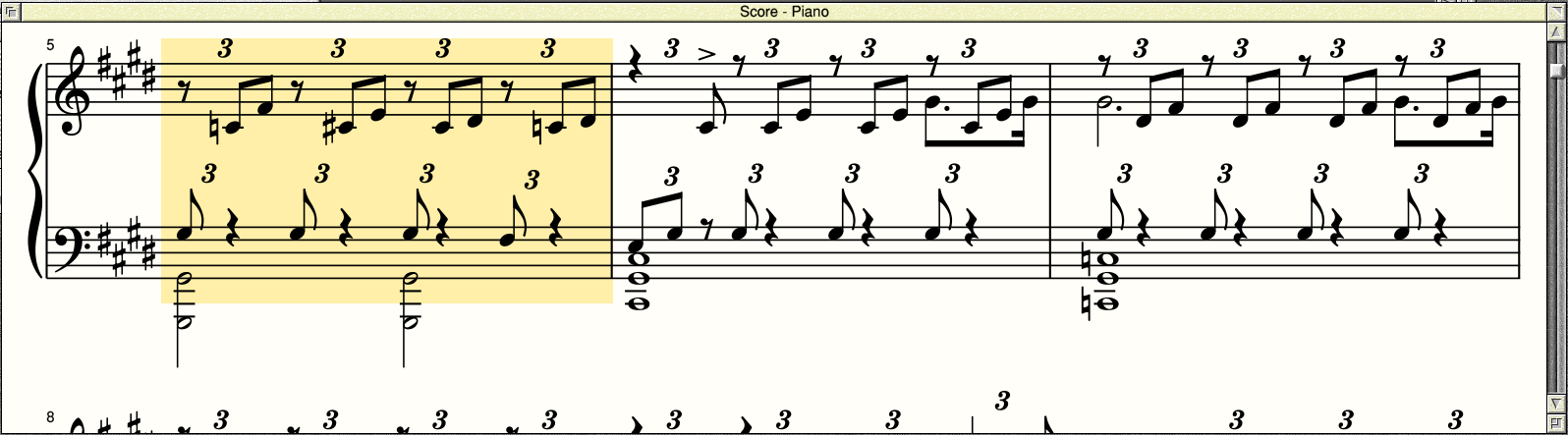
Groove’s Score window following playback, with the sounding bar lit. Screenshot: Andrew Youll / Groove user guide (GitHub).
Printing and MusicXML export
The score, or each player’s part on its own pages, can be printed through !Printers, with numbered pages. MusicXML export from the Song menu writes the song as a score that MuseScore, Sibelius, Dorico and Finale open, with each drum and instrument track as a part.
Installing
Copy the new !Groove over the old one. Songs from earlier versions load unchanged. 0.4 was tested on a Raspberry Pi 4. The User Guide, on the icon bar menu, has a new Score chapter.
Groove-0.4.zip is on the GitHub release page. Groove is MIT licensed. Youll notes that he used AI to help with the release.
Discussion continues in the forum thread.