


SVGDraw Converts SVG Files to RISC OS Drawfiles
Richard Windley of The Really Small Software Company has announced SVGDraw, a new application that converts SVG files to RISC OS Drawfiles. The announcement was posted on the RISC OS Open Announcements forum under the title “Another SVG converter”, and the product page lists version 0.10, an 84K download dated 4 November 2026.
Why Another Converter
In his announcement, Richard explains that he only found out after creating SVGDraw that the most recent version of Draw can load SVG files. However, for his use case, that version of Draw could not handle the file he had, so the effort was not wasted.
How It Works
Dragging an SVG file to SVGDraw’s icon bar icon opens it in a window, which can be zoomed. Pressing F3 saves the picture as a Drawfile, which can then be used in any application that accepts Draw files, including older versions of Draw. If the SVG is edited in another program, it can be reloaded to pick up the changes.
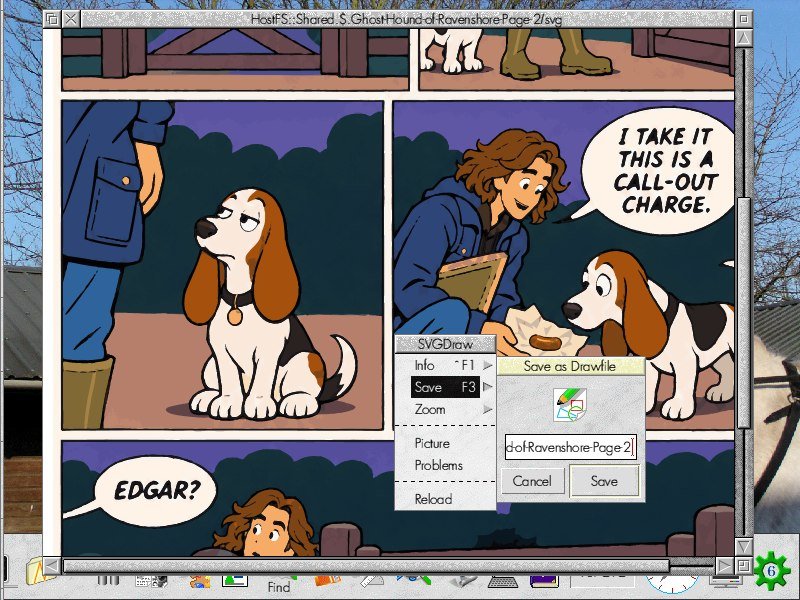
SVGDraw displaying a complex SVG file, with the Save as Drawfile dialogue open. Screenshot from the SVGDraw product page, The Really Small Software Company.
Supported Features
SVGDraw handles shapes and paths, including every kind of curve and arc; fills, outlines, dashes, line caps and joins; opacity and gradients; CSS style sheets, reused symbols, nested drawings, markers and clipping; text, including text that follows a path, set in RISC OS outline fonts; and embedded PNG and JPEG images.
According to the product page, the converter was tested against more than 1,300 files from a widely used SVG test suite, and on complex artwork it matches the reference renderer pixel for pixel.
Some SVG effects, such as filters and masks, have no Drawfile equivalent. When a file uses one, a Problems window lists it along with its line number, so users know exactly what to check.
Choices
A Choices window gives some control over the conversion. Options include storing images as JPEG, the JPEG quality and largest image size, gradient smoothness, curve accuracy, and a memory limit.
Availability
SVGDraw requires a 32-bit version of RISC OS. It is available to download from The Really Small Software Company’s SVGDraw page, and discussion is taking place in the forum announcement thread.